The Holy Grail of Heating Thermostats: A Plot Twist (TRV801Z vs TRV801_1)
I bought 8 MOES TRV valves and discovered that firmware lottery can ruin your heating automation. Here's what I learned at -14°C outside.

Back in January, I wrote about finding the perfect Zigbee TRV for Home Assistant. The MOES TRV801 had everything I wanted: beautiful LED display, quiet operation, great battery life, and most importantly, it worked perfectly with Better Thermostat integration.
So when I needed more thermostats, I ordered from the same seller, same product listing. Same results, right?
The Chinese Firmware Lottery
Anyone who's been buying Zigbee devices from AliExpress knows this feeling. Same product photos, same listing, completely different firmware inside.
When the new batch arrived, the pairing process was already different. You need to scroll left with the minus button until "OFF" appears, then hold SET for 5 seconds. Not what the manual says, but I've dealt with worse.
The real problem? No hand icon ☝ on the display. That icon indicates Manual mode, and without it, Better Thermostat loses its grip on the valve.
TRV801_1 vs TRV801Z: The Missing Mode
Here's the original thermostat (TRV801_1) in Zigbee2MQTT:

Preset options: auto, manual, off, on
And here's what I received (TRV801Z):
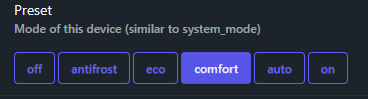
Preset options: off, antifrost, eco, comfort, auto, on
No manual mode. The mode that tells the TRV to just execute whatever temperature it receives without thinking.

SONOFF ZBDongle-P - ZigBee Coordinator
The foundation of any ZigBee setup with Home Assistant. Without a solid coordinator, your TRVs are just expensive thermometers. Proven, stable, affordable.
Device Identifiers
For those searching (you'll thank me later):
| Feature | TRV801_1 (Old) | TRV801Z (New) |
|---|---|---|
| Zigbee Model | TS0601 | TS0601 |
| Manufacturer | _TZE200_mudxchsu | _TZE204_qyr2m29i |
| Z2M Page | TRV801_1 | TRV801Z |
| Presets | auto, manual, off, on | off, antifrost, eco, comfort, auto, on |
| Position entity | Read-only | Read-only |
| Hysteresis | Mode (comfort/eco) | Hysteresis (comfort/eco) |
What Didn't Work
I tried replicating my working setup from the original article. Same Better Thermostat settings, same external temperature sensor, same logic.
The valve would slam to 100% or stay at 0%. The TRV was running its own show, following internal comfort/eco logic instead of listening to Home Assistant.
Preset combinations
Every option gave different problems:
preset: comfort- TRV ignores BT, follows internal algorithmpreset: auto- Follows internal weekly schedulepreset: on- 100% open, alwayspreset: off- Closed, always
Versatile Thermostat with Direct Valve Control
TRV801Z exposes a position entity showing valve opening percentage. I thought I could bypass the TRV's brain entirely using Versatile Thermostat with "Direct valve control".
Installed it, configured as "Over climate" with direct valve control, went to select the position entity and... nothing. The position entity is read-only. The TRV reports its valve state but doesn't accept commands.
From the Zigbee2MQTT docs:
"Position. Value can be found in the published state on the position property. It's not possible to read (/get) or write (/set) this value."
Dead end.
What Actually Works: Aggressive Calibration
After reading the Better Thermostat documentation more carefully, I found the answer. The Aggressive calibration mode doesn't try to gently correct the TRV. It lies to it.
The Configuration
In Zigbee2MQTT:
Preset: comfort
Hysteresis: comfort
The hysteresis: comfort setting enables smooth 0-100% valve control instead of binary on/off.
In Better Thermostat:

| Setting | Value |
|---|---|
| Calibration Type | Target Temperature Based |
| Calibration Mode | Aggressive |
| Overheat Protection | Enabled |
| Use 5°C instead of off | Enabled |
| Swap auto/heat modes | Disabled |
| Maintenance mode alternative | Disabled |
| Ignore all TRV inputs | Enabled |
| HomematicIP throttling | Disabled |
How Aggressive Mode Works
When Better Thermostat wants 21.5°C and the room is at 19°C, it doesn't send 21.5°C to the TRV. It sends 23°C, 24°C, even 25.5°C. The TRV thinks it needs to heat aggressively, opens the valve wide, and the room warms up faster.
As the room approaches the target, BT gradually reduces its "lie" until the temperatures converge.
SONOFF SNZB-02 - Temperature Sensor
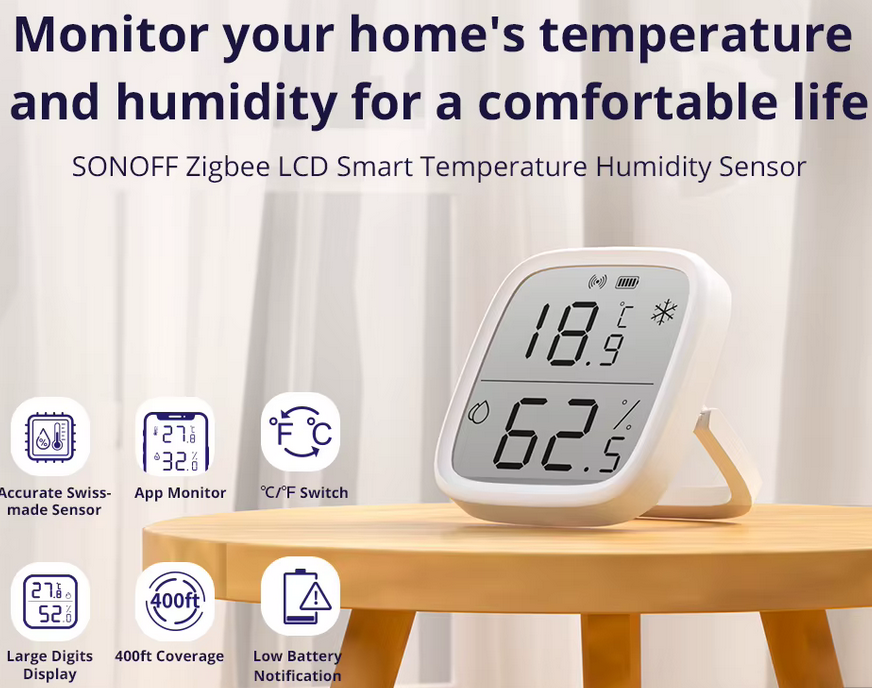
TRV's built-in thermometer sits next to the radiator - it lies. This tiny sensor measures actual room temperature. Battery lasts a year. Essential for accurate automation.
Test Results
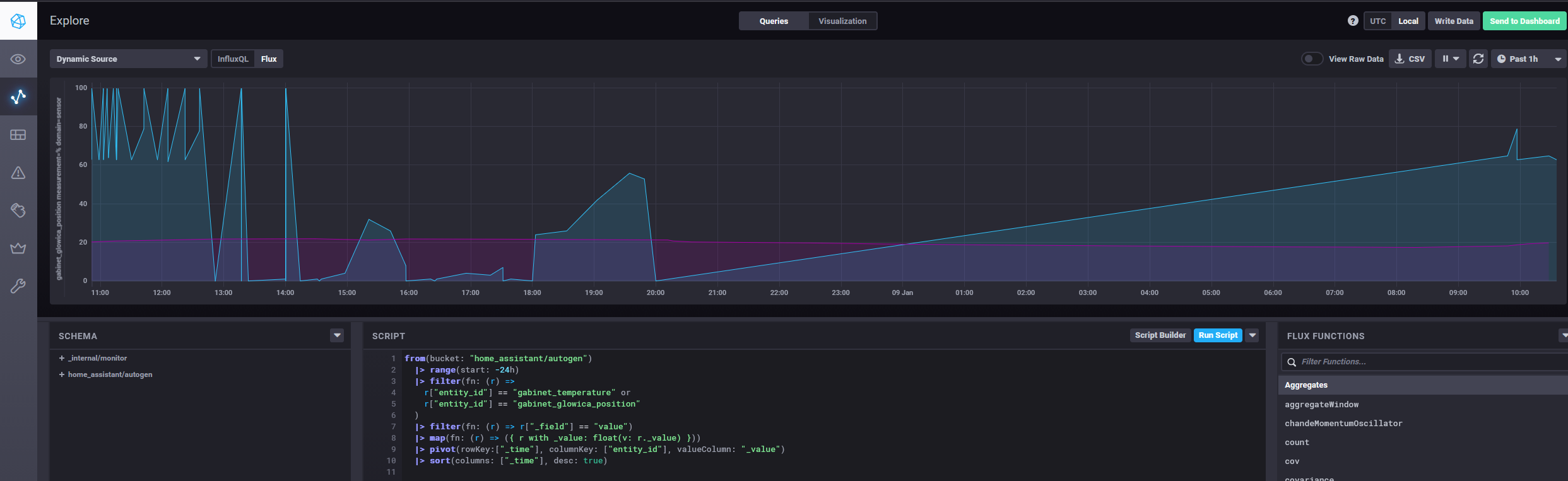
I ran a heating cycle from 18.5°C to 21.5°C and logged everything to InfluxDB.
Temperature Progression
| Time | Room Temp | TRV Setpoint | Valve Position |
|---|---|---|---|
| 07:17 | 18.54°C | 5°C | 0% |
| 08:31 | 19.17°C | 20°C | 88% |
| 09:09 | 19.17°C | 23°C | 100% |
| 09:51 | 20.21°C | 22.5°C | 63% |
| 10:15 | 20.72°C | 23.5°C | 63-100% |
| 10:55 | 21.0°C | 24.5-25°C | 63% |
| 11:05 | 21.24°C | 24.5°C | 62-100% |
| 11:36 | 21.5°C | 25.5°C | 78-100% |
| 11:51 | 21.75°C | 21°C | 0% |
BT pushed the setpoint all the way to 25.5°C to reach a target of 21.5°C. Once the room hit 21.75°C, it dropped the setpoint to 21°C and the valve closed.

ZigBee Door/Window Sensor
Open window + radiator at max = money flying out (literally). Pair with Home Assistant to auto-stop heating when windows are open. Cheap insurance for your heating bill.
The Oscillation Pattern
The valve didn't smoothly decrease from 100% to 0%. Instead, it oscillated between two states:
- ON mode (100%) - BT switches TRV to
preset: onwhen it wants maximum heating - COMFORT mode (62-78%) - BT switches to
preset: comfortfor proportional control
The logs show this clearly:
11:03:10 - state changed to "heating" triggered by Climate: Set HVAC mode
11:03:06 - state changed to "Auto" triggered by Climate: Set HVAC mode
10:58:51 - state changed to "heating" triggered by Climate: Set HVAC mode
10:51:46 - state changed to "Auto" triggered by Climate: Set HVAC mode
BT rapidly switches between modes to approximate the valve opening it wants. It's not elegant, but it works.
InfluxDB Query
For those who want to analyze their own data:
from(bucket: "home_assistant/autogen")
  |> range(start: -7h)
  |> filter(fn: (r) =>
    r["entity_id"] == "gabinet_temperature" or
    r["entity_id"] == "gabinet_glowica_position"
  )
  |> filter(fn: (r) => r["_field"] == "value")
  |> map(fn: (r) => ({ r with _value: float(v: r._value) }))
  |> pivot(rowKey:["_time"], columnKey: ["entity_id"], valueColumn: "_value")
  |> sort(columns: ["_time"], desc: true)
Recommended Z2M Settings
Beyond the preset and hysteresis, I also adjusted:
- Comfort temperature: 22°C (close to my actual 21.5°C target)
- Eco temperature: 17°C (matches my BT night mode)
This gives BT more headroom to work with when using comfort mode.
Not a Downgrade, Just Different
Here's the thing: the Aggressive calibration approach isn't worse. It might even be faster.
Both thermostats reach the target temperature in roughly the same time. The difference is purely cosmetic - how it looks in Home Assistant logs and dashboards.
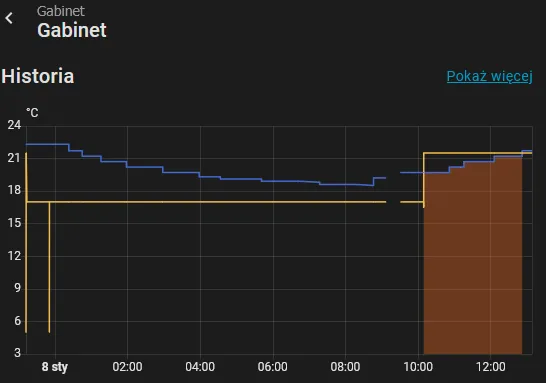
TRV801Z (New, Aggressive Mode) - Office
Temperature and setpoint:
Valve position:
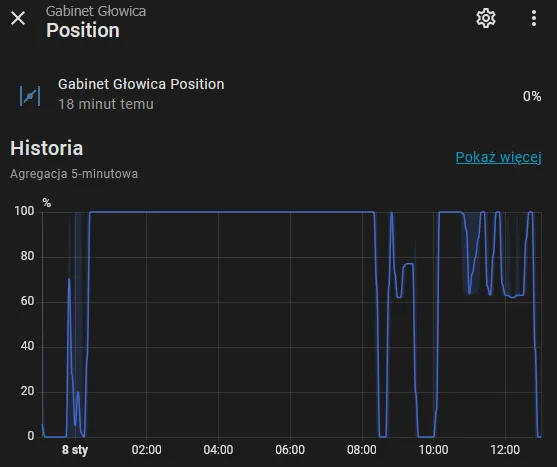
The valve jumps between 0%, ~65%, and 100%. The setpoint line looks erratic. But the room heats up steadily.
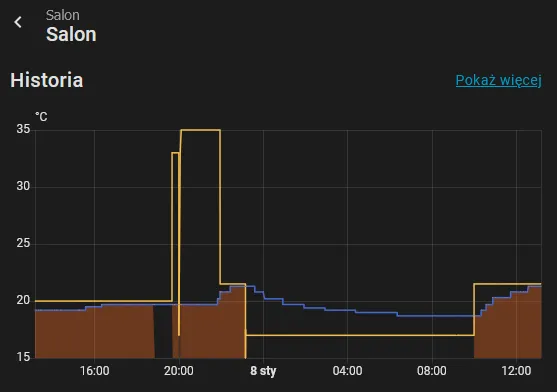
TRV801_1 (Old, Manual Mode) - Living Room
Temperature and setpoint:
Valve position:
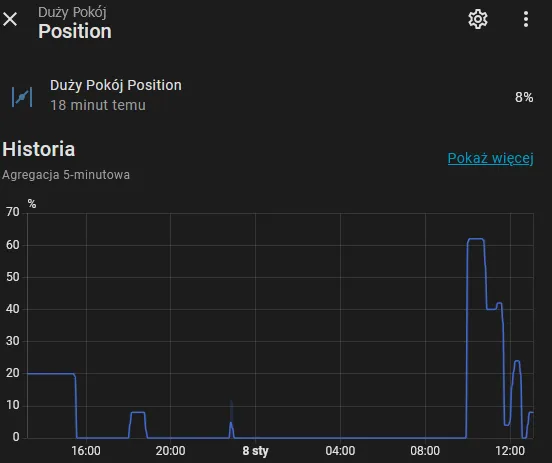
The valve moves smoothly between 0% and ~70%. The setpoint stays constant. The graph looks "cleaner".
Same Result
Both rooms reached their target temperatures. Both maintained them without overshooting. The old TRV looks prettier in charts, the new one looks like it's having a seizure. But they both heat the room.
Since these TRVs are nearly silent (no loud valve clicks), you won't notice the difference in daily use. The aggressive mode oscillations happen in the background. The room just gets warm.
What I Learned
Buying the "same" Chinese Zigbee device twice doesn't guarantee the same firmware. Check the manufacturerName in Z2M before assuming compatibility. The _TZE200_* variants have manual mode. The _TZE204_* variants might not.
When a TRV doesn't offer manual mode, Aggressive calibration in Better Thermostat compensates effectively. The valve oscillates, the presets switch rapidly, the setpoint looks insane in the logs. But the room reaches and maintains the target temperature just as well.
If you care about clean graphs, hunt for the old firmware. If you just want a warm room, Aggressive mode works fine.
Where to Buy
The MOES TRV:
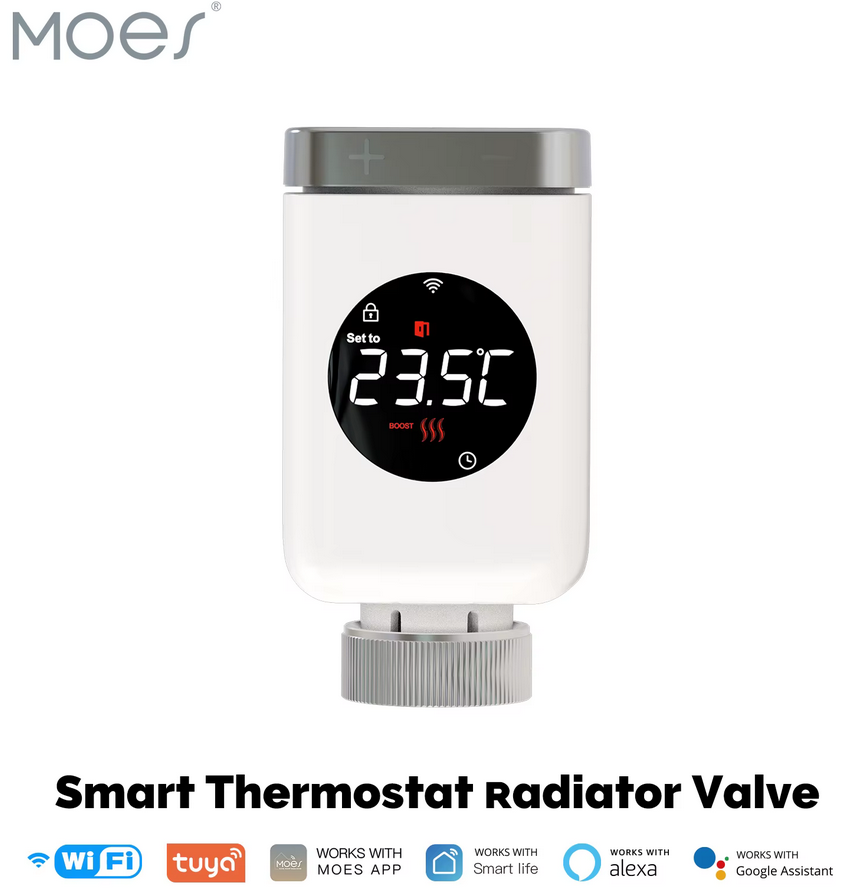
MOES TRV ZigBee - Smart Radiator Valve
Smart thermostatic radiator valve with ZigBee connectivity. Works great with Home Assistant and Zigbee2MQTT, but watch out for firmware differences - same model, different behavior. Full breakdown in the article.
You might receive TRV801_1 (with manual mode) or TRV801Z (without). Ask the seller about firmware version, or just configure Aggressive calibration and move on with your life.
Buy Me a Coffee
Fuel my creativity with a coffee — every sip keeps this blog running!

Support This Blog — Because Heroes Deserve Recognition!
Whether it's a one-time tip or a subscription, your support keeps this blog alive and kicking. Thank you for being awesome!
Tip OnceHey, Want to Join Me on This Journey? ☕
While I'm brewing my next technical deep-dive (and probably another cup of coffee), why not become a regular part of this caffeinated adventure?
Subscribe